The following table shows the access to members permitted by each modifier from higher precedence to lower.
| Modifier | Class | Package | Subclass | World |
|---|---|---|---|---|
public | Y | Y | Y | Y |
protected | Y | Y | Y | N |
| no modifier | Y | Y | N | N |
private | Y | N | N | N |
Let's look at a collection of classes and see how access levels affect visibility. The following figure shows the four classes in this example and how they are related
.
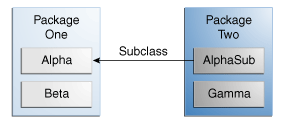
Classes and Packages of the Example Used to Illustrate Access Levels
The following table shows where the members of the Alpha class are visible for each of the access modifiers that can be applied to them.
| Modifier | Alpha | Beta | Alphasub | Gamma |
|---|---|---|---|---|
public | Y | Y | Y | Y |
protected | Y | Y | Y | N |
| no modifier | Y | Y | N | N |
private | Y | N | N | N |


